Tuesday, March 18, 2008

Things About Tibet and Stuff You Probably Didn't Know About

  1. The Dalai Lama received millions of dollars from the CIA to train guerillas to fight against China. The aid stopped after Nixon's visit to China. Not so much nonviolent now?

  2. Before falling under Chinese control, Tibet was a theocracy headed by the lamas. The lamas lived in riches and exploited the poor.

  3. Tibet was a feudal society. The monk class controlled all the wealth and were supported by a class of serfs. Serfs composed the vast majority of the population in 1951. The peasants were taxed up the ass and often mutilated if they got out of line. E.g. Eye gouging.

  4. The monks used to go out to the peasant villages and pick out young boys (9 years old), and bring them into the monasteries to be used as sexual objects and alter recruited into monkhood.

  5. There was slavery. Aristocrats had servants in their homes who owned nothing and had practically no rights. Their descendants were born into slavery and bound to their masters.

  6. Serfs were taxed for a variety of things. Getting married, birth of a child, a death in the family, planting a tree, keeping animals, religious festivals or dancing in the street.

In general, Tibet was a shit hole.
Source for most stuff:
http://www.michaelparenti.org/Tibet.html

Monday, March 10, 2008

EPMSync Errors

"object reference not set to an instance of an object" When clicking on Edit Mappings:
queryString = String.Format(CultureInfo.InvariantCulture, "SELECT ID FROM sfATTRIBUTES WHERE AccountID = {0} AND InternalName='WORKFLOW_STATUS'", accountId); command = new SqlCommand(queryString, connection);
int WFAttributeID = (int)command.ExecuteScalar();

Error is thrown when ExecuteScalar returns null. Make sure you set the Portfolio Server Account Id properly and that query does in fact return something.

"The given key was not present in the dictionary" When clicking on Edit Mappings:
The default EPMSync.config that came with the installation already contained some Field Mappings. Delete everything between the tags and it should work.

EPMSync

Thursday, March 6, 2008

Dammit Al

Damn you Al Gore! Where's that Global Warming you promised!

Wednesday, February 20, 2008

QA Server Down

Our QA server has been down since we tried to restart it and it didn't boot back up. It took 5 hours and counting for someone to go find it and switch it back on...

Also the vending machine's out of Cokes... sons of bitches

Tuesday, February 19, 2008

Why I Will Never Buy an Apple Product

Other than that Apple products are generally grossly overpriced and shitty, their marketing department just caters to the lowest common denominator.

For some reason, the PC goes to upgrade without knowing if all his hardware is compatible with Vista. I guess Mac users aren't smart enough to figure it out so MacOS is backwards compatible with all the on hardware. Building this backward compatibility into a Mac is pretty easy since there are only a handful of hardware that you can find in a Mac.

Getting a virus is now Windows' fault now? Who's clicked on the flashing banner? Who clicked on the entirely normal looking email attachment? I guess some people just don't have the common sense to own a Windows machine. This ad just says "Hey, you don't need to be smart to use a Mac!"

Itunes? Worst piece of shit ever made. Talk about bloated. What if I just want to listen to my music without connecting to my Ipod(which I've never touched) and finding out about the artist of the month.

So Ilife comes with every Mac huh? I don't need that shit. Sounds like bloat to me.

Mac don't have to restart, I get it. And PC's do? Since when?

Is it necessary to have Sarah Jessica Parker, who I would do regardless of her penchant for Apple, endorse a Mac? It is because people who buy Ipods and Macs buy them for the social status and "[celebrity] uses a Mac."

Usually, the product that uses celebrity endorsement is usually shittier. E.g. Pepsi vs Coke.

What is this supposed to say? "PC don't like to play music"? Retarded

Macs are BETTER AT MUSIC. Can you give a more retardedly generic statement than that?

Linux Lies

Lower Cost - Lie. Everything can be free if you want it to be.
Stability
- Lie. I have never had to restart my Windows because "something crashed". If something crashed on you in Windows, you did something wrong and it was your fault.
Security - Lie. Again, if your Windows' security is compromised, it was your fault. Don't blame the doorman if you invite thieves into your house. When was the last time I had a virus? 1996. When I was 11. So if you are older than 11 and your computer's virused up the ass, congratulations, you are an idiot.
You Have All The Software You Need - Lie. Most open source counterparts of proprietary software are shitty. OpenOffice? Shitty. GIMPshop? Shitty.
Choice - Lie. No matter what distribution you choose, you end up with the same shit. Their differences exist for the sake of being different. I hate people who are different for the sake of being different. Bastards.

Thursday, February 7, 2008

Save Report Parameters with Report Viewer

To save a report as a Linked Report with different parameters would be a very nice feature to have in MS Reporting Services, but for some reason Microsoft decided to implement this in their default report viewer.

I first tried to modify the ReportViewer control but you can't really add any custom functionality to it. So I had to add a floating button at the approximate position on the Report Viewer toolbar.

1. Create basic page with a Report Viewer control. Download the ReportViewer control here and install it. Open a new ASP project in Visual Studio and add the control to default.aspx by dragging it from the toolbox > data section. Change the mode to server report and enter the address of your Reporting Services server.

2. Add the floating button. By using CSS, we can add an additional button to the webpage and make it blend with the rest of the tool bar.

<span ><blockquote style="color: rgb(0, 153, 0);">//HTML<div class="floater">
<input value="Save Link" id="save" class="button" onclick="Effect.Appear(document.getElementById('popup'))" type="button">
</div>

//CSS
.floater
{
vertical-align:middle;

float:right;
right:20px;
top: 40px;
width:50px;
height:50px;
position:absolute;
}
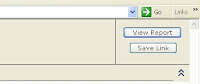
You get the point. I used scriptaculous for effects. Clicking the button with reveal a hidden div with a textbox to enter the name of the new linked report. Saving will call another .aspx file to save the report with a xmlHttp call.

3. Function to save a linked report. I implemented this using AJAX and a different .aspx. I didn't really like to have the page refreshing. I'll explain further later on. First, we have to create a linked report. This is fairly easy to do with
CreateLinkedReport(NEWNAME, PATH, REPORT, props);
This creates a linked report called NEWNAME in PATH and it will be a copy of REPORT.

To save the parameters of the report, the best way is to run the report first and use ServerReport.GetParameters to get the last used parameters. You have to call GetParameters from the instance of your ReportViewer control.
ReportParameterInfoCollection ic = viewer1.ServerReport.GetParameters();
You will have to add a web reference to the Reporting Services web service. Click Project > Add Web Reference... and enter http://[server host]/Reportserver/Reportservice.asmx?WSDL. GetParameters gives you a collection of ReportParameterInfos. However, we need an array of ReportParameter objects to use SetReportParameters to set default parameters of the linked report.

4. My Reports. Usually users will want to put their linked reports in their "My Reports" folder. each of these folder has permission settings that only allow the user to add reports. We will need to impersonate that user in order to put a new linked report in the folder. Add this line to your web.config
<system.web>
<identity impersonate="true">
</system.web>
and take off Allow Anynomous Access in your IIS settings.

For more information about any of the methods used, read MSDN. More info about AJAX on Google.